# Context
React.Context 提供了一个无需为每层组件手动添加 props,就能在组件树间进行数据传递的方法。
Context 设计目的是为了共享哪些对于一个组件树而言是“全局”的数据,例如当前认证的用户、主题或首选语言。
# createContext
createContext 源码并不是很多,去掉 Dev 代码如下:
export function createContext<T>(
  defaultValue: T,
  calculateChangedBits: ?(a: T, b: T) => number,
): ReactContext<T> {
  if (calculateChangedBits === undefined) {
    calculateChangedBits = null;
  }
  const context: ReactContext<T> = {
    $$typeof: REACT_CONTEXT_TYPE,
    _calculateChangedBits: calculateChangedBits, // 计算新老context变化
    _currentValue: defaultValue,
    _currentValue2: defaultValue,
    _threadCount: 0,
    // These are circular
    Provider: (null: any),
    Consumer: (null: any),
  };

  context.Provider = {
    $$typeof: REACT_PROVIDER_TYPE,
    _context: context,
  };

  let hasWarnedAboutUsingNestedContextConsumers = false;
  let hasWarnedAboutUsingConsumerProvider = false;

  context.Consumer = context;

]  return context;
}
2
3
4
5
6
7
8
9
10
11
12
13
14
15
16
17
18
19
20
21
22
23
24
25
26
27
28
29
30
_currentValue 用来记录 Provider/Consumer 的 value 值 默认为 defaultValue
在 context 设置 Provider 和 Consumer 属性值
Provider 属性 表示给 context 的 provider 设置属性值 如果我们需要设置当前 Provider 上的 value 值 则直接使用 context.Provider._context._currentValue 进行设置
Consumer 属性
表示给 context 设置 Consumer 设置属性值 如果我们需要获取当前通过 Provider 上的 value 值 则直接通过自身的 Consumer 组件的 context.Consumer._context._currentValue 获取 value 值
- return context 对象
返回的 context 对象中包含 Provider/Consumer/_currentValue/_calculateChangedBits 计算新老 context 变化等值
从上面可以看到这就是一个套娃的过程, Consumer 可以轻松的获取到 _currentValue
# updateContextConsumer
createContext 的简单使用如下:
import React, { Component, createContext, useConText } from "react";

const ColorContext = createContext(null);
const { Provider, Consumer } = ColorContext;

console.log("ColorContext", ColorContext);
console.log("Provider", Provider);
console.log("Consumer", Consumer);

class App extends Component {
  constructor(props) {
    super(props);
    this.state = {
      color: "red",
      background: "cyan",
    };
  }
  render() {
    return <Provider value={this.state}>{this.props.children}</Provider>;
  }
}
function Article({ children }) {
  return (
    <App>
      <h1>Context</h1>
      <p>hello world</p>
      {children}
    </App>
  );
}
function Paragraph({ color, background }) {
  return (
    <div style={{ backgroundColor: background }}>
      <span style={{ color }}>text</span>
    </div>
  );
}
function TestContext() {
  return (
    <Article>
      <Consumer>
        {(state) => {
          return <Paragraph {...state} />;
        }}
      </Consumer>
    </Article>
  );
}

export default TestContext;
2
3
4
5
6
7
8
9
10
11
12
13
14
15
16
17
18
19
20
21
22
23
24
25
26
27
28
29
30
31
32
33
34
35
36
37
38
39
40
41
42
43
44
45
46
47
48
49
50
要使用我们必须得使用 Consumer Tag,在 beninWork 中我们可以看到当 tag 为 ContextConsumer 时调用 updateContextConsumer :
function updateContextConsumer(
  current: Fiber | null,
  workInProgress: Fiber,
  renderExpirationTime: ExpirationTime,
) {
  let context: ReactContext<any> = workInProgress.type;
  context = (context: any)._context;
  const newProps = workInProgress.pendingProps;
  const render = newProps.children;

  prepareToReadContext(workInProgress, renderExpirationTime);
  const newValue = readContext(context, newProps.unstable_observedBits);
  let newChildren;
  newChildren = render(newValue);
  // React DevTools reads this flag.
  workInProgress.effectTag |= PerformedWork;
  reconcileChildren(current, workInProgress, newChildren, renderExpirationTime);
  return workInProgress.child;
}
2
3
4
5
6
7
8
9
10
11
12
13
14
15
16
17
18
19
可以看到调用 readContext , newValue 是从 Provider value 属性的赋值。
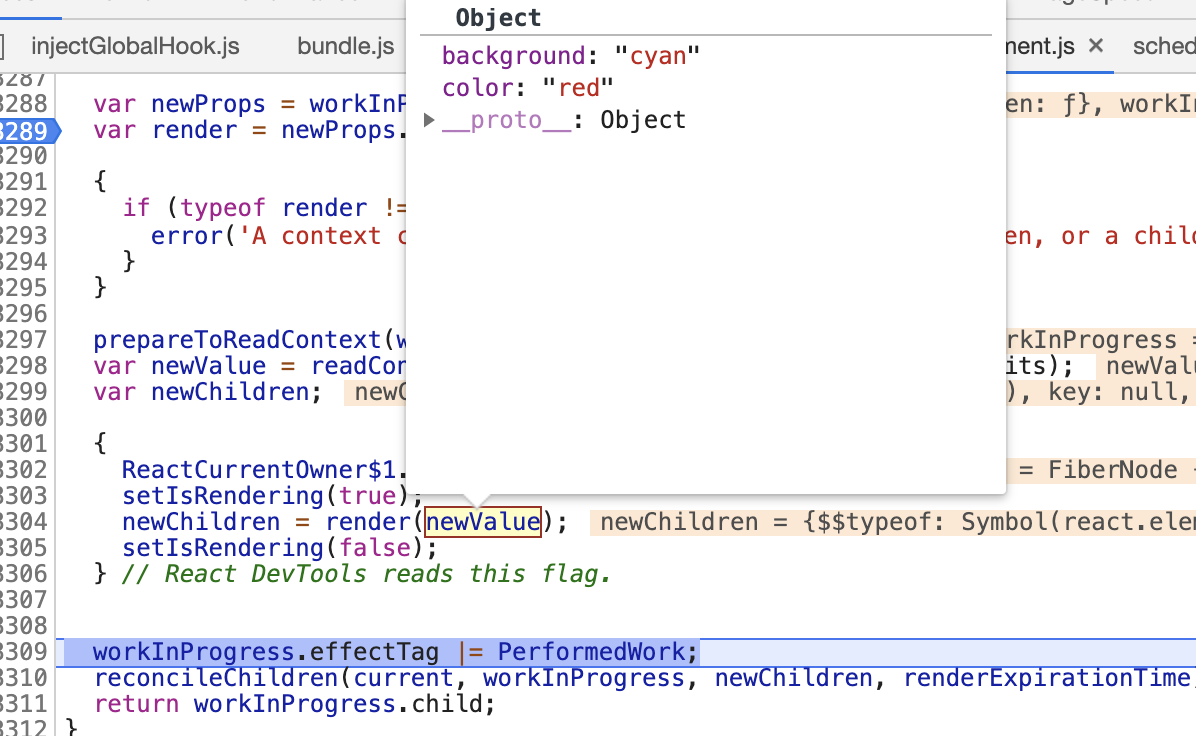
看到这我不知道你有没有想说一句,卧槽,原来是这样啊,难怪我们的 Consumer 要写成那样 😭
# readContext
readContext 代码我只需要关心一行代码:
function readContext<T>(
  context: ReactContext<T>,
  observedBits: void | number | boolean,
){
    ...
    return isPrimaryRenderer ? context._currentValue : context._currentValue2;
}
2
3
4
5
6
7
看到这我惊了,原来 Context 的实现这么的简单,但是也太好用了吧,真香
# useContext
useContext 最后转了一圈还是回到了 readContext 最后还是上面那句代码,😤